محاكاة هاملتونيان آيزنغ المُركَّل باستخدام الدوائر الديناميكية
تقدير الاستخدام: 7.5 دقائق على معالج Heron r3. (ملاحظة: هذا تقدير فقط. قد يختلف وقت التشغيل الفعلي.) الدوائر الديناميكية هي دوائر ذات تغذية أمامية كلاسيكية - بمعنى آخر، هي قياسات في منتصف الدائرة تتبعها عمليات منطقية كلاسيكية تحدد العمليات الكمومية المشروطة بالمخرجات الكلاسيكية. في هذا البرنامج التعليمي، نحاكي نموذج آيزنغ المُركَّل على شبكة سداسية من اللفات ونستخدم الدوائر الديناميكية لتحقيق تفاعلات تتجاوز الاتصالية الفيزيائية للعتاد.
تمت دراسة نموذج آيزنغ على نطاق واسع في مجالات الفيزياء المختلفة. يُنمذج اللفات التي تخضع لتفاعلات آيزنغ بين مواقع الشبكة، بالإضافة إلى الركلات من المجال المغناطيسي المحلي في كل موقع. التطور الزمني المتروتري للّفات المعتبرة في هذا البرنامج التعليمي، المأخوذ من [1]، يُعطى بالوحدوي التالي:
لاستكشاف ديناميكيات اللف، ندرس متوسط المغنطة للّفات في كل موقع كدالة لخطوات تروتر. لذلك، نبني المرصد التالي:
لتحقيق تفاعل ZZ بين مواقع الشبكة، نقدم حلاً باستخدام ميزة الدائرة الديناميكية، مما يؤدي إلى عمق ثنائي الكيوبت أقصر بشكل ملحوظ مقارنة بطريقة التوجيه القياسية ببوابات SWAP. من ناحية أخرى، عادةً ما تستغرق عمليات التغذية الأمامية الكلاسيكية في الدوائر الديناميكية وقتاً أطول في التنفيذ مقارنة بالبوابات الكمومية؛ وبالتالي، فإن للدوائر الديناميكية قيوداً ومقايضات. كما نقدم طريقة لإضافة تسلسل فك الاقتران الديناميكي على الكيوبتات الخاملة أثناء عملية التغذية الأمامية الكلاسيكية باستخدام مدة التمدد.
المتطلبات
قبل البدء في هذا البرنامج التعليمي، تأكد من تثبيت ما يلي:
-
Qiskit SDK الإصدار 2.0 أو أحدث مع دعم التصور
-
Qiskit Runtime الإصدار 0.37 أو أحدث مع دعم التصور (
pip install 'qiskit-ibm-runtime[visualization]') -
مكتبة رسوم Rustworkx البيانية (
pip install rustworkx) -
Qiskit Aer (
pip install qiskit-aer)
الإعداد
# Added by doQumentation — installs the packages this notebook needs if they are missing
import importlib.util

_needed = {"matplotlib": "matplotlib", "numpy": "numpy", "qiskit": "qiskit", "qiskit_aer": "qiskit-aer", "qiskit_ibm_runtime": "qiskit-ibm-runtime", "rustworkx": "rustworkx"}
_missing = [pip for module, pip in _needed.items()
            if importlib.util.find_spec(module) is None]
# One at a time, so a package that fails to install does not block the others
for _pip in _missing:
    %pip install -q {_pip}
if not _missing:
    print("\u2713 All required packages are installed")
import numpy as np
from typing import List
import rustworkx as rx
import matplotlib.pyplot as plt
from rustworkx.visualization import mpl_draw
from qiskit.circuit import (
    Parameter,
    QuantumCircuit,
    QuantumRegister,
    ClassicalRegister,
)
from qiskit.transpiler import CouplingMap
from qiskit.quantum_info import SparsePauliOp
from qiskit.circuit.classical import expr
from qiskit.transpiler.preset_passmanagers import (
    generate_preset_pass_manager,
)
from qiskit.transpiler import PassManager
from qiskit.circuit.library import RZGate, XGate
from qiskit.transpiler.passes import (
    ALAPScheduleAnalysis,
    PadDynamicalDecoupling,
)

from qiskit.transpiler.basepasses import TransformationPass
from qiskit.circuit.measure import Measure
from qiskit.transpiler.passes.utils.remove_final_measurements import (
    calc_final_ops,
)
from qiskit.circuit import Instruction

from qiskit.visualization import plot_circuit_layout
from qiskit.circuit.tools import pi_check

from qiskit_aer import AerSimulator
from qiskit_aer.primitives import SamplerV2 as Aer_Sampler

from qiskit_ibm_runtime import (
    QiskitRuntimeService,
    Batch,
    SamplerV2 as Sampler,
)
from qiskit.providers.exceptions import QiskitBackendNotFoundError
from qiskit_ibm_runtime.visualization import (
    draw_circuit_schedule_timing,
)
الخطوة 1: تعيين المدخلات الكلاسيكية إلى دائرة كمومية
نبدأ بتعريف الشبكة المراد محاكاتها. نختار العمل مع شبكة قرص العسل (تسمى أيضاً سداسية)، وهي رسم بياني مستوٍ بعقد من الدرجة 3. هنا، نحدد حجم الشبكة ومعاملات الدائرة ذات الصلة في الديناميكيات المتروترية. نحاكي التطور الزمني المتروتري تحت نموذج آيزنغ عند ثلاث قيم مختلفة لـ للمجال المغناطيسي المحلي.
hex_rows = 3  # specify lattice size
hex_cols = 5
depths = range(9)  # specify Trotter steps
zz_angle = np.pi / 8  # parameter for ZZ interaction
max_angle = np.pi / 2  # max theta angle
points = 3  # number of theta parameters

θ = Parameter("θ")
params = np.linspace(0, max_angle, points)
def make_hex_lattice(hex_rows=1, hex_cols=1):
    """Define hexagon lattice."""
    hex_cmap = CouplingMap.from_hexagonal_lattice(
        hex_rows, hex_cols, bidirectional=False
    )
    data = list(hex_cmap.physical_qubits)
    graph = hex_cmap.graph.to_undirected(multigraph=False)
    edge_colors = rx.graph_misra_gries_edge_color(graph)
    layer_edges = {color: [] for color in edge_colors.values()}
    for edge_index, color in edge_colors.items():
        layer_edges[color].append(graph.edge_list()[edge_index])
    return data, layer_edges, hex_cmap, graph
لنبدأ بمثال اختباري صغير:
hex_rows_test = 1
hex_cols_test = 2

data_test, layer_edges_test, hex_cmap_test, graph_test = make_hex_lattice(
    hex_rows=hex_rows_test, hex_cols=hex_cols_test
)

# display a small example for illustration
node_colors_test = ["lightblue"] * len(graph_test.node_indices())
pos = rx.graph_spring_layout(
    graph_test,
    k=5 / np.sqrt(len(graph_test.nodes())),
    repulsive_exponent=1,
    num_iter=150,
)
mpl_draw(graph_test, node_color=node_colors_test, pos=pos)

سنستخدم المثال الصغير للتوضيح والمحاكاة. أدناه نبني أيضاً مثالاً كبيراً لإظهار أنه يمكن توسيع سير العمل إلى أحجام كبيرة.
data, layer_edges, hex_cmap, graph = make_hex_lattice(
    hex_rows=hex_rows, hex_cols=hex_cols
)
num_qubits = len(data)
print(f"num_qubits = {num_qubits}")

# display the honeycomb lattice to simulate
node_colors = ["lightblue"] * len(graph.node_indices())
pos = rx.graph_spring_layout(
    graph,
    k=5 / np.sqrt(num_qubits),
    repulsive_exponent=1,
    num_iter=150,
)
mpl_draw(graph, node_color=node_colors, pos=pos)
plt.show()
num_qubits = 46

بناء الدوائر الوحدوية
مع تحديد حجم المسألة والمعاملات، نحن الآن جاهزون لبناء الدائرة ذات المعاملات التي تحاكي التطور الزمني المتروتري لـ مع خطوات تروتر مختلفة، المحددة بالوسيط depth. الدائرة التي نبنيها تحتوي على طبقات متناوبة من بوابات Rx() وبوابات Rzz. تحقق بوابات Rzz تفاعلات ZZ بين اللفات المتقارنة، والتي ستوضع بين كل موقع شبكة محدد بالوسيط layer_edges.
def gen_hex_unitary(
    num_qubits=6,
    zz_angle=np.pi / 8,
    layer_edges=[
        [(0, 1), (2, 3), (4, 5)],
        [(1, 2), (3, 4), (5, 0)],
    ],
    θ=Parameter("θ"),
    depth=1,
    measure=False,
    final_rot=True,
):
    """Build unitary circuit."""
    circuit = QuantumCircuit(num_qubits)
    # Build trotter layers
    for _ in range(depth):
        for i in range(num_qubits):
            circuit.rx(θ, i)
        circuit.barrier()
        for coloring in layer_edges.keys():
            for e in layer_edges[coloring]:
                circuit.rzz(zz_angle, e[0], e[1])
        circuit.barrier()
    # Optional final rotation, set True to be consistent with Ref. [1]
    if final_rot:
        for i in range(num_qubits):
            circuit.rx(θ, i)
    if measure:
        circuit.measure_all()

    return circuit
تصور دائرة الاختبار الصغيرة:
circ_unitary_test = gen_hex_unitary(
    num_qubits=len(data_test),
    layer_edges=layer_edges_test,
    θ=Parameter("θ"),
    depth=1,
    measure=True,
)
circ_unitary_test.draw(output="mpl", fold=-1)

بالمثل، نبني الدوائر الوحدوية للمثال الكبير عند خطوات تروتر مختلفة والمرصد لتقدير القيمة المتوقعة.
circuits_unitary = []
for depth in depths:
    circ = gen_hex_unitary(
        num_qubits=num_qubits,
        layer_edges=layer_edges,
        θ=Parameter("θ"),
        depth=depth,
        measure=True,
    )
    circuits_unitary.append(circ)
observables_unitary = SparsePauliOp.from_sparse_list(
    [("Z", [i], 1 / num_qubits) for i in range(num_qubits)],
    num_qubits=num_qubits,
)
بناء تنفيذ الدائرة الديناميكية
يوضح هذا القسم التنفيذ الرئيسي للدائرة الديناميكية لمحاكاة نفس التطور الزمني المتروتري. لاحظ أن شبكة قرص العسل التي نريد محاكاتها لا تتطابق مع الشبكة الثقيلة لكيوبتات العتاد. إحدى الطرق المباشرة لتعيين الدائرة على العتاد هي إدخال سلسلة من عمليات SWAP لجعل الكيوبتات المتفاعلة متجاورة، لتحقيق تفاعل ZZ. هنا نسلط الضوء على نهج بديل باستخدام الدوائر الديناميكية كحل، مما يوضح أنه يمكننا استخدام مزيج من الحوسبة الكمومية والكلاسيكية في الوقت الحقيقي داخل دائرة في Qiskit لتحقيق تفاعلات تتجاوز الجوار المباشر.
في تنفيذ الدائرة الديناميكية، يتم تنفيذ تفاعل ZZ فعلياً باستخدام كيوبتات مساعدة، وقياس في منتصف الدائرة، وتغذية أمامية. لفهم هذا، لاحظ أن دورانات ZZ تطبق عامل طور على الحالة بناءً على تكافؤها. لكيوبتين، حالات الأساس الحسابي هي ، ، ، و . تطبق بوابة دوران ZZ عامل طور على الحالتين و اللتين تكافؤهما (عدد الواحدات في الحالة) فردي وتترك الحالات ذات التكافؤ الزوجي دون تغيير. يصف ما يلي كيف يمكننا تنفيذ تفاعلات ZZ فعلياً على كيوبتين باستخدام الدوائر الديناميكية.
-
حساب التكافؤ في كيوبت مساعد: بدلاً من تطبيق ZZ مباشرة على كيوبتين، نقدم كيوبتاً ثالثاً، الكيوبت المساعد، لتخزين معلومات التكافؤ لكيوبتَي البيانات. نقوم بتشابك الكيوبت المساعد مع كل كيوبت بيانات باستخدام بوابات CX من كيوبت البيانات إلى الكيوبت المساعد.
-
تطبيق دوران Z أحادي الكيوبت على الكيوبت المساعد: وذلك لأن الكيوبت المساعد يحتوي على معلومات التكافؤ لكيوبتَي البيانات، مما ينفذ فعلياً دوران ZZ على كيوبتات البيانات.
-
قياس الكيوبت المساعد في أساس X: هذه هي الخطوة الأساسية التي تؤدي إلى انهيار حالة الكيوبت المساعد، ونتيجة القياس تخبرنا بما حدث:
-
القياس 0: عند ملاحظة نتيجة 0، نكون قد طبقنا بشكل صحيح دوران على كيوبتات البيانات لدينا.
-
القياس 1: عند ملاحظة نتيجة 1، نكون قد طبقنا بدلاً من ذلك.
-
-
تطبيق بوابة التصحيح عند قياس 1: إذا قسنا 1، نطبق بوابات Z على كيوبتات البيانات لـ "إصلاح" طور الإضافي.
الدائرة الناتجة هي التالية:
 عندما نتبنى هذا النهج لمحاكاة شبكة قرص العسل، تتضمن الدائرة الناتجة بشكل مثالي في العتاد ذي الشبكة السداسية الثقيلة: جميع كيوبتات البيانات تقع على المواقع ذات الدرجة 3 في الشبكة، والتي تشكل شبكة سداسية. كل زوج من كيوبتات البيانات يتشارك كيوبتاً مساعداً يقع على موقع ذي الدرجة 2. أدناه، نبني شبكة الكيوبتات لتنفيذ الدائرة الديناميكية، مع إدخال الكيوبتات المساعدة (المعروضة بالدوائر الأرجوانية الداكنة).
def make_lattice(hex_rows=1, hex_cols=1):
    """Define heavy-hex lattice and corresponding lists of data and ancilla nodes."""
    hex_cmap = CouplingMap.from_hexagonal_lattice(
        hex_rows, hex_cols, bidirectional=False
    )
    data = list(hex_cmap.physical_qubits)

    heavyhex_cmap = CouplingMap()
    for d in data:
        heavyhex_cmap.add_physical_qubit(d)

    # make coupling map
    a = len(data)
    for edge in hex_cmap.get_edges():
        heavyhex_cmap.add_physical_qubit(a)
        heavyhex_cmap.add_edge(edge[0], a)
        heavyhex_cmap.add_edge(edge[1], a)
        a += 1
    ancilla = list(range(len(data), a))
    qubits = data + ancilla

    # color edges
    graph = heavyhex_cmap.graph.to_undirected(multigraph=False)
    edge_colors = rx.graph_misra_gries_edge_color(graph)
    layer_edges = {color: [] for color in edge_colors.values()}
    for edge_index, color in edge_colors.items():
        layer_edges[color].append(graph.edge_list()[edge_index])

    # construct observable
    obs_hex = SparsePauliOp.from_sparse_list(
        [("Z", [i], 1 / len(data)) for i in data],
        num_qubits=len(qubits),
    )

    return (data, qubits, ancilla, layer_edges, heavyhex_cmap, graph, obs_hex)
تصور شبكة السداسية الثقيلة لكيوبتات البيانات والكيوبتات المساعدة على نطاق صغير:
(data, qubits, ancilla, layer_edges, heavyhex_cmap, graph, obs_hex) = (
    make_lattice(hex_rows=hex_rows, hex_cols=hex_cols)
)

print(f"number of data qubits = {len(data)}")
print(f"number of ancilla qubits = {len(ancilla)}")

node_colors = []
for node in graph.node_indices():
    if node in ancilla:
        node_colors.append("purple")
    else:
        node_colors.append("lightblue")

pos = rx.graph_spring_layout(
    graph,
    k=1 / np.sqrt(len(qubits)),
    repulsive_exponent=2,
    num_iter=200,
)

# Visualize the graph, blue circles are data qubits and purple circles are ancillas
mpl_draw(graph, node_color=node_colors, pos=pos)
plt.show()
number of data qubits = 46
number of ancilla qubits = 60

أدناه، نبني الدائرة الديناميكية للتطور الزمني المتروتري. يتم استبدال بوابات RZZ بتنفيذ الدائرة الديناميكية باستخدام الخطوات الموصوفة أعلاه.
def gen_hex_dynamic(
    depth=1,
    zz_angle=np.pi / 8,
    θ=Parameter("θ"),
    hex_rows=1,
    hex_cols=1,
    measure=False,
    add_dd=True,
):
    """Build dynamic circuits."""
    (data, qubits, ancilla, layer_edges, heavyhex_cmap, graph, obs_hex) = (
        make_lattice(hex_rows=hex_rows, hex_cols=hex_cols)
    )
    # Initialize circuit
    qr = QuantumRegister(len(qubits), "qr")
    cr = ClassicalRegister(len(ancilla), "cr")
    circuit = QuantumCircuit(qr, cr)

    for k in range(depth):
        # Single-qubit Rx layer
        for d in data:
            circuit.rx(θ, d)
        circuit.barrier()

        # CX gates from data qubits to ancilla qubits
        for same_color_edges in layer_edges.values():
            for e in same_color_edges:
                circuit.cx(e[0], e[1])
        circuit.barrier()

        # Apply Rz rotation on ancilla qubits and rotate into X basis
        for a in ancilla:
            circuit.rz(zz_angle, a)
            circuit.h(a)
        # Add barrier to align terminal measurement
        circuit.barrier()

        # Measure ancilla qubits
        for i, a in enumerate(ancilla):
            circuit.measure(a, i)
        d2ros = {}
        a2ro = {}
        # Retrieve ancilla measurement outcomes
        for a in ancilla:
            a2ro[a] = cr[ancilla.index(a)]

        # For each data qubit, retrieve measurement outcomes of neighboring
        # ancilla qubits
        for d in data:
            ros = [a2ro[a] for a in heavyhex_cmap.neighbors(d)]
            d2ros[d] = ros

        # Build classical feedforward operations (optionally add DD on idling
        # data qubits)
        for d in data:
            if add_dd:
                circuit = add_stretch_dd(circuit, d, f"data_{d}_depth_{k}")

            # # XOR the neighboring readouts of the data qubit;
            # if True, apply Z to it
            ros = d2ros[d]
            parity = ros[0]
            for ro in ros[1:]:
                parity = expr.bit_xor(parity, ro)
            with circuit.if_test(expr.equal(parity, True)):
                circuit.z(d)

        # Reset the ancilla if its readout is 1
        for a in ancilla:
            with circuit.if_test(expr.equal(a2ro[a], True)):
                circuit.x(a)
        circuit.barrier()

    # Final single-qubit Rx layer to match the unitary circuits
    for d in data:
        circuit.rx(θ, d)

    if measure:
        circuit.measure_all()
    return circuit, obs_hex

def add_stretch_dd(qc, q, name):
    """Add XpXm DD sequence."""
    s = qc.add_stretch(name)
    qc.delay(s, q)
    qc.x(q)
    qc.delay(s, q)
    qc.delay(s, q)
    qc.rz(np.pi, q)
    qc.x(q)
    qc.rz(-np.pi, q)
    qc.delay(s, q)
    return qc
فك الاقتران الديناميكي (DD) ودعم مدة stretch
أحد التحفظات على استخدام تنفيذ الدائرة الديناميكية لتحقيق تفاعل ZZ هو أن القياس في منتصف الدائرة وعمليات التغذية الأمامية الكلاسيكية عادةً ما تستغرق وقتاً أطول في التنفيذ مقارنة بالبوابات الكمومية. لقمع فقدان ترابط الكيوبتات خلال وقت الخمول اللازم لحدوث العمليات الكلاسيكية، أضفنا تسلسل فك الاقتران الديناميكي (DD) بعد عملية القياس على الكيوبتات المساعدة، وقبل عملية Z المشروطة على كيوبت البيانات، قبل عبارة if_test.
يتم إضافة تسلسل DD بواسطة الدالة add_stretch_dd()، التي تستخدم مدد stretch لتحديد الفترات الزمنية بين بوابات DD. مدة stretch هي طريقة لتحديد مدة زمنية قابلة للتمدد لعملية delay بحيث يمكن لمدة التأخير أن تنمو لملء وقت خمول الكيوبت. يتم حل متغيرات المدة المحددة بـ stretch في وقت التجميع إلى المدد المطلوبة التي تفي بقيد معين. هذا مفيد جداً عندما يكون توقيت تسلسلات DD أساسياً لتحقيق أداء جيد في قمع الأخطاء. لمزيد من التفاصيل حول نوع stretch، راجع وثائق OpenQASM. حالياً، دعم نوع stretch تجريبي. للاطلاع على قيود استخدامه، يرجى الرجوع إلى قسم القيود في وثائق stretch.
باستخدام الدوال المعرفة أعلاه، نبني دوائر التطور الزمني المتروتري، مع وبدون DD، والمرصدات المقابلة. نبدأ بتصور الدائرة الديناميكية لمثال صغير:
hex_rows_test = 1
hex_cols_test = 1

(
    data_test,
    qubits_test,
    ancilla_test,
    layer_edges_test,
    heavyhex_cmap_test,
    graph_test,
    obs_hex_test,
) = make_lattice(hex_rows=hex_rows_test, hex_cols=hex_cols_test)

node_colors = []
for node in graph_test.node_indices():
    if node in ancilla_test:
        node_colors.append("purple")
    else:
        node_colors.append("lightblue")
pos = rx.graph_spring_layout(
    graph_test,
    k=5 / np.sqrt(len(qubits_test)),
    repulsive_exponent=2,
    num_iter=150,
)

# display a small example for illustration
node_colors_test = ["lightblue"] * len(graph_test.node_indices())
mpl_draw(graph_test, node_color=node_colors, pos=pos)

circuit_dynamic_test, obs_dynamic_test = gen_hex_dynamic(
    depth=1,
    θ=Parameter("θ"),
    hex_rows=hex_rows_test,
    hex_cols=hex_cols_test,
    measure=False,
    add_dd=False,
)
circuit_dynamic_test.draw("mpl", fold=-1)

circuit_dynamic_dd_test, _ = gen_hex_dynamic(
    depth=1,
    θ=Parameter("θ"),
    hex_rows=hex_rows_test,
    hex_cols=hex_cols_test,
    measure=False,
    add_dd=True,
)
circuit_dynamic_dd_test.draw("mpl", fold=-1)

بالمثل، نبني الدوائر الديناميكية للمثال الكبير:
circuits_dynamic = []
circuits_dynamic_dd = []
observables_dynamic = []
for depth in depths:
    circuit, obs = gen_hex_dynamic(
        depth=depth,
        θ=Parameter("θ"),
        hex_rows=hex_rows,
        hex_cols=hex_cols,
        measure=True,
        add_dd=False,
    )
    circuits_dynamic.append(circuit)

    circuit_dd, _ = gen_hex_dynamic(
        depth=depth,
        θ=Parameter("θ"),
        hex_rows=hex_rows,
        hex_cols=hex_cols,
        measure=True,
        add_dd=True,
    )
    circuits_dynamic_dd.append(circuit_dd)
    observables_dynamic.append(obs)
الخطوة 2: تحسين المسألة لتنفيذها على العتاد
نحن الآن جاهزون لتحويل الدائرة إلى العتاد. سنقوم بتحويل كل من التنفيذ الوحدوي القياسي وتنفيذ الدائرة الديناميكية إلى العتاد.
للتحويل إلى العتاد، نقوم أولاً بإنشاء مثيل للخلفية. إذا كانت متاحة، سنختار خلفية تدعم تعليمة MidCircuitMeasure (measure_2).
service = QiskitRuntimeService()
try:
    backend = service.least_busy(
        operational=True,
        simulator=False,
        use_fractional_gates=True,
        filters=lambda b: "measure_2" in b.supported_instructions,
    )
except QiskitBackendNotFoundError:
    backend = service.least_busy(
        operational=True,
        simulator=False,
        use_fractional_gates=True,
    )
التحويل للدوائر الديناميكية
أولاً، نحوّل الدوائر الديناميكية، مع وبدون إضافة تسلسل DD. لضمان استخدام نفس مجموعة الكيوبتات الفيزيائية في جميع الدوائر للحصول على نتائج أكثر اتساقاً، نحوّل الدائرة مرة واحدة أولاً، ثم نستخدم تخطيطها لجميع الدوائر اللاحقة، المحدد بـ initial_layout في مدير التمرير. ثم نبني كتل البريمتيف الموحدة (PUBs) كمدخل لبريمتيف Sampler.
pm_temp = generate_preset_pass_manager(
    optimization_level=3,
    backend=backend,
)
isa_temp = pm_temp.run(circuits_dynamic[-1])
dynamic_layout = isa_temp.layout.initial_index_layout(filter_ancillas=True)

pm = generate_preset_pass_manager(
    optimization_level=3, backend=backend, initial_layout=dynamic_layout
)

dynamic_isa_circuits = [pm.run(circ) for circ in circuits_dynamic]
dynamic_pubs = [(circ, params) for circ in dynamic_isa_circuits]

dynamic_isa_circuits_dd = [pm.run(circ) for circ in circuits_dynamic_dd]
dynamic_pubs_dd = [(circ, params) for circ in dynamic_isa_circuits_dd]
يمكننا تصور تخطيط الكيوبتات للدائرة المحولة أدناه. تُظهر الدوائر السوداء كيوبتات البيانات والكيوبتات المساعدة المستخدمة في تنفيذ الدائرة الديناميكية.
def _heron_coords_r2():
    cord_map = np.array(
        [
            [
                0,
                1,
                2,
                3,
                4,
                5,
                6,
                7,
                8,
                9,
                10,
                11,
                12,
                13,
                14,
                15,
                3,
                7,
                11,
                15,
                0,
                1,
                2,
                3,
                4,
                5,
                6,
                7,
                8,
                9,
                10,
                11,
                12,
                13,
                14,
                15,
                1,
                5,
                9,
                13,
                0,
                1,
                2,
                3,
                4,
                5,
                6,
                7,
                8,
                9,
                10,
                11,
                12,
                13,
                14,
                15,
                3,
                7,
                11,
                15,
                0,
                1,
                2,
                3,
                4,
                5,
                6,
                7,
                8,
                9,
                10,
                11,
                12,
                13,
                14,
                15,
                1,
                5,
                9,
                13,
                0,
                1,
                2,
                3,
                4,
                5,
                6,
                7,
                8,
                9,
                10,
                11,
                12,
                13,
                14,
                15,
                3,
                7,
                11,
                15,
                0,
                1,
                2,
                3,
                4,
                5,
                6,
                7,
                8,
                9,
                10,
                11,
                12,
                13,
                14,
                15,
                1,
                5,
                9,
                13,
                0,
                1,
                2,
                3,
                4,
                5,
                6,
                7,
                8,
                9,
                10,
                11,
                12,
                13,
                14,
                15,
                3,
                7,
                11,
                15,
                0,
                1,
                2,
                3,
                4,
                5,
                6,
                7,
                8,
                9,
                10,
                11,
                12,
                13,
                14,
                15,
            ],
            -1
            * np.array([j for i in range(15) for j in [i] * [16, 4][i % 2]]),
        ],
        dtype=int,
    )

    hcords = []
    ycords = cord_map[0]
    xcords = cord_map[1]
    for i in range(156):
        hcords.append([xcords[i] + 1, np.abs(ycords[i]) + 1])

    return hcords
plot_circuit_layout(
    dynamic_isa_circuits_dd[8],
    backend,
    qubit_coordinates=_heron_coords_r2(),
    view="virtual",
)
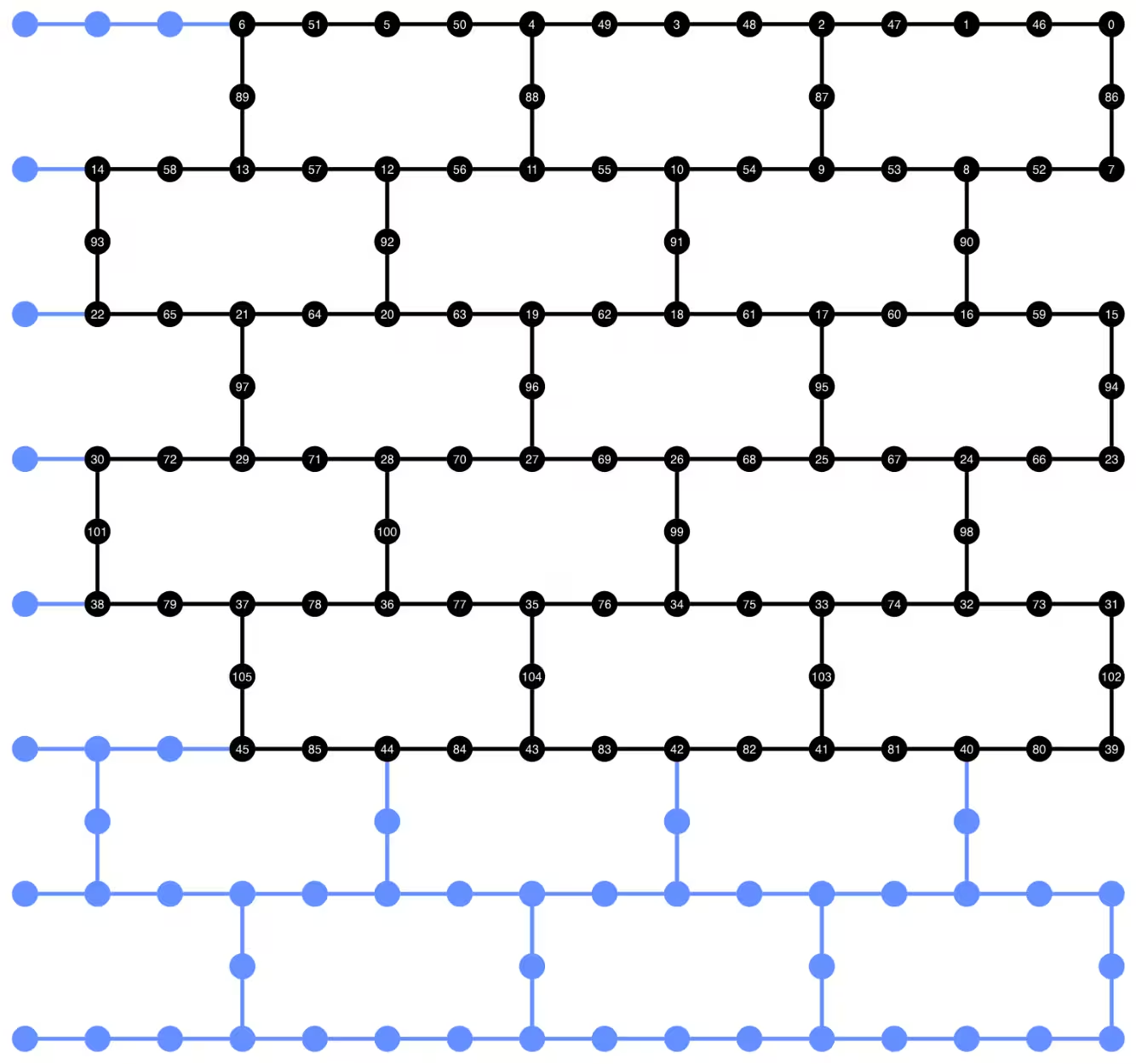
إذا ظهرت أخطاء بشأن عدم العثور على neato من plot_circuit_layout()، تأكد من تثبيت حزمة graphviz وتوفرها في PATH الخاص بك. إذا تم تثبيتها في موقع غير افتراضي (على سبيل المثال، باستخدام homebrew على MacOS)، قد تحتاج إلى تحديث متغير البيئة PATH. يمكن القيام بذلك داخل هذا الدفتر باستخدام ما يلي:
import os
os.environ['PATH'] = f"path/to/neato{os.pathsep}{os.environ['PATH']}"
dynamic_isa_circuits[1].draw(fold=-1, output="mpl", idle_wires=False)

dynamic_isa_circuits_dd[1].draw(fold=-1, output="mpl", idle_wires=False)

التحويل باستخدام MidCircuitMeasure
MidCircuitMeasure هو إضافة إلى عمليات القياس المتاحة، تمت معايرتها خصيصاً لإجراء القياسات في منتصف الدائرة. تُعيَّن تعليمة MidCircuitMeasure إلى تعليمة measure_2 المدعومة من قبل الخلفيات. لاحظ أن measure_2 غير مدعومة على جميع الخلفيات. يمكنك استخدام service.backends(filters=lambda b: "measure_2" in b.supported_instructions) للعثور على الخلفيات التي تدعمها. هنا، نوضح كيفية تحويل الدائرة بحيث يتم تنفيذ القياسات في منتصف الدائرة المعرفة في الدائرة باستخدام عملية MidCircuitMeasure، إذا كانت الخلفية تدعمها.
أدناه، نطبع المدة لتعليمة measure_2 وتعليمة measure القياسية.
print(
    f'Mid-circuit measurement `measure_2` duration: '
    f"{backend.instruction_durations.get('measure_2',0) * backend.dt * 1e9/1e3} μs"
)
print(
    f'Terminal measurement `measure` duration: '
    f"{backend.instruction_durations.get('measure',0) * backend.dt *1e9/1e3} μs"
)
Mid-circuit measurement `measure_2` duration: 1.3800000000000003 μs
Terminal measurement `measure` duration: 2.1800000000000006 μs
"""Pass that replaces terminal measures in the middle of the circuit with
MidCircuitMeasure instructions."""

class ConvertToMidCircuitMeasure(TransformationPass):
    """This pass replaces terminal measures in the middle of the circuit with
    MidCircuitMeasure instructions.
    """

    def __init__(self, target):
        super().__init__()
        self.target = target

    def run(self, dag):
        """Run the pass on a dag."""
        mid_circ_measure = None
        for inst in self.target.instructions:
            if isinstance(inst[0], Instruction) and inst[0].name.startswith(
                "measure_"
            ):
                mid_circ_measure = inst[0]
                break
        if not mid_circ_measure:
            return dag

        final_measure_nodes = calc_final_ops(dag, {"measure"})
        for node in dag.op_nodes(Measure):
            if node not in final_measure_nodes:
                dag.substitute_node(node, mid_circ_measure, inplace=True)

        return dag

pm = PassManager(ConvertToMidCircuitMeasure(backend.target))

dynamic_isa_circuits_meas2 = [pm.run(circ) for circ in dynamic_isa_circuits]
dynamic_pubs_meas2 = [(circ, params) for circ in dynamic_isa_circuits_meas2]

dynamic_isa_circuits_dd_meas2 = [
    pm.run(circ) for circ in dynamic_isa_circuits_dd
]
dynamic_pubs_dd_meas2 = [
    (circ, params) for circ in dynamic_isa_circuits_dd_meas2
]
التحويل للدوائر الوحدوية
لإجراء مقارنة عادلة بين الدوائر الديناميكية ونظيراتها الوحدوية، نستخدم نفس مجموعة الكيوبتات الفيزيائية المستخدمة في الدوائر الديناميكية لكيوبتات البيانات كتخطيط لتحويل الدوائر الوحدوية.
init_layout = [
    dynamic_layout[ind] for ind in range(circuits_unitary[0].num_qubits)
]

pm = generate_preset_pass_manager(
    target=backend.target,
    initial_layout=init_layout,
    optimization_level=3,
)

def transpile_minimize(circ: QuantumCircuit, pm: PassManager, iterations=10):
    """Transpile circuits for specified number of iterations and return the one
    with smallest two-qubit gate depth"""
    circs = [pm.run(circ) for i in range(iterations)]
    circs_sorted = sorted(
        circs,
        key=lambda x: x.depth(lambda x: x.operation.num_qubits == 2),
    )
    return circs_sorted[0]

unitary_isa_circuits = []
for circ in circuits_unitary:
    circ_t = transpile_minimize(circ, pm, iterations=100)
    unitary_isa_circuits.append(circ_t)

unitary_pubs = [(circ, params) for circ in unitary_isa_circuits]
نتصور تخطيط الكيوبتات للدوائر الوحدوية المحولة. تشير الدوائر السوداء إلى الكيوبتات الفيزيائية المستخدمة لتحويل الدوائر الوحدوية وفهارسها تتوافق مع فهارس الكيوبتات الافتراضية. بمقارنة هذا مع التخطيط المرسوم للدوائر الديناميكية، يمكننا التأكد من أن الدوائر الوحدوية تستخدم نفس مجموعة الكيوبتات الفيزيائية ككيوبتات البيانات في الدوائر الديناميكية.
plot_circuit_layout(
    unitary_isa_circuits[-1],
    backend,
    qubit_coordinates=_heron_coords_r2(),
    view="virtual",
)
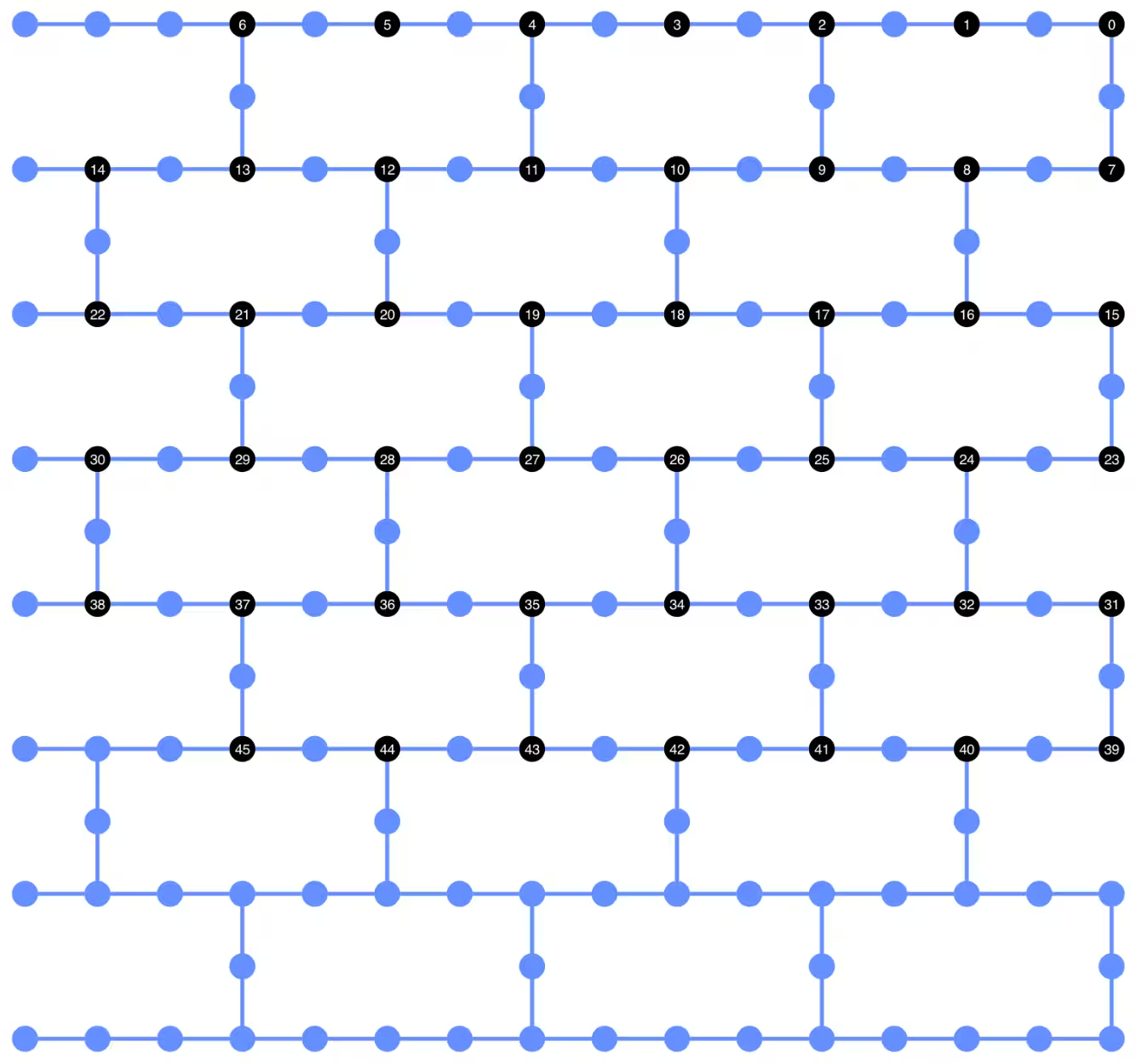
نضيف الآن تسلسل DD إلى الدوائر المحولة ونبني كتل PUB المقابلة لتقديم المهام.
pm_dd = PassManager(
    [
        ALAPScheduleAnalysis(target=backend.target),
        PadDynamicalDecoupling(
            dd_sequence=[
                XGate(),
                RZGate(np.pi),
                XGate(),
                RZGate(-np.pi),
            ],
            spacing=[1 / 4, 1 / 2, 0, 0, 1 / 4],
            target=backend.target,
        ),
    ]
)

unitary_isa_circuits_dd = pm_dd.run(unitary_isa_circuits)
unitary_pubs_dd = [(circ, params) for circ in unitary_isa_circuits_dd]
مقارنة عمق البوابات ثنائية الكيوبت للدوائر الوحدوية والديناميكية
# compare circuit depth of unitary and dynamic circuit implementations
unitary_depth = [
    unitary_isa_circuits[i].depth(lambda x: x.operation.num_qubits == 2)
    for i in range(len(unitary_isa_circuits))
]

dynamic_depth = [
    dynamic_isa_circuits[i].depth(lambda x: x.operation.num_qubits == 2)
    for i in range(len(dynamic_isa_circuits))
]

plt.plot(
    list(range(len(unitary_depth))),
    unitary_depth,
    label="unitary circuits",
    color="#be95ff",
)
plt.plot(
    list(range(len(dynamic_depth))),
    dynamic_depth,
    label="dynamic circuits",
    color="#ff7eb6",
)
plt.xlabel("Trotter steps")
plt.ylabel("Two-qubit depth")
plt.legend()
<matplotlib.legend.Legend at 0x12628b0e0>

الفائدة الرئيسية للدائرة القائمة على القياس هي أنه عند تنفيذ تفاعلات ZZ متعددة، يمكن موازاة طبقات CX، ويمكن أن تحدث القياسات بشكل متزامن. وذلك لأن جميع تفاعلات ZZ تتبادلية، لذا يمكن إجراء الحساب بعمق قياس 1. بعد تحويل الدوائر، نلاحظ أن نهج الدائرة الديناميكية ينتج عمق بوابات ثنائية الكيوبت أقصر بشكل ملحوظ مقارنة بالنهج الوحدوي القياسي، مع التحفظ بأن القياس الإضافي في منتصف الدائرة والتغذية الأمامية الكلاسيكية نفسها تستغرق وقتاً وتُدخل مصادر أخطاء خاصة بها.
الخطوة 3: التنفيذ باستخدام بريمتيفات Qiskit
وضع الاختبار المحلي
قبل تقديم المهام إلى العتاد، يمكننا تشغيل محاكاة اختبارية صغيرة للدائرة الديناميكية باستخدام وضع الاختبار المحلي.
aer_sim = AerSimulator()
pm = generate_preset_pass_manager(backend=aer_sim, optimization_level=1)
circuit_dynamic_test.measure_all()
isa_qc = pm.run(circuit_dynamic_test)
with Batch(backend=aer_sim) as batch:
    sampler = Sampler(mode=batch)
    result = sampler.run([(isa_qc, params)]).result()

print(
    "Simulated average magnetization at trotter step = 1 at three theta values"
)
result[0].data["meas"].expectation_values(obs_dynamic_test[0])
Simulated average magnetization at trotter step = 1 at three theta values
array([ 0.16666667, 0.01529948, -0.14290365])
محاكاة MPS
للدوائر الكبيرة، يمكننا استخدام محاكي matrix_product_state (MPS)، الذي يوفر نتيجة تقريبية للقيمة المتوقعة وفقاً لبُعد الرابطة المختار. نستخدم لاحقاً نتائج محاكاة MPS كخط أساس لمقارنة النتائج من العتاد.
# The MPS simulation below took approximately 7 minutes to run on a
# laptop with Apple M1 chip

mps_backend = AerSimulator(
    method="matrix_product_state",
    matrix_product_state_truncation_threshold=1e-5,
    matrix_product_state_max_bond_dimension=100,
)
mps_sampler = Aer_Sampler.from_backend(mps_backend)

shots = 4096

data_sim = []
for j in range(points):
    circ_list = [
        circ.assign_parameters([params[j]]) for circ in circuits_unitary
    ]

    mps_job = mps_sampler.run(circ_list, shots=shots)
    result = mps_job.result()

    point_data = [
        result[d].data["meas"].expectation_values(observables_unitary)
        for d in depths
    ]

    data_sim.append(point_data)  # data at one theta value

data_sim = np.array(data_sim)
مع إعداد الدوائر والمرصدات، ننفذها الآن على العتاد باستخدام بريمتيف Sampler.
هنا نقدم ثلاث مهام لـ unitary_pubs و dynamic_pubs و dynamic_pubs_dd. كل منها عبارة عن قائمة من الدوائر ذات المعاملات المقابلة لتسع خطوات تروتر مختلفة مع ثلاثة معاملات مختلفة.
shots = 10000

with Batch(backend=backend) as batch:
    sampler = Sampler(mode=batch)

    sampler.options.experimental = {
        "execution": {
            "scheduler_timing": True
        },  # set to True to retrieve circuit timing info
    }

    job_unitary = sampler.run(unitary_pubs, shots=shots)
    print(f"unitary: {job_unitary.job_id()}")

    job_unitary_dd = sampler.run(unitary_pubs_dd, shots=shots)
    print(f"unitary_dd: {job_unitary_dd.job_id()}")

    job_dynamic = sampler.run(dynamic_pubs, shots=shots)
    print(f"dynamic: {job_dynamic.job_id()}")

    job_dynamic_dd = sampler.run(dynamic_pubs_dd, shots=shots)
    print(f"dynamic_dd: {job_dynamic_dd.job_id()}")

    job_dynamic_meas2 = sampler.run(dynamic_pubs_meas2, shots=shots)
    print(f"dynamic_meas2: {job_dynamic_meas2.job_id()}")

    job_dynamic_dd_meas2 = sampler.run(dynamic_pubs_dd_meas2, shots=shots)
    print(f"dynamic_dd_meas2: {job_dynamic_dd_meas2.job_id()}")
unitary: d96s4b52su3c739hakrg
unitary_dd: d96s4bt2su3c739haksg
dynamic: d96s4c0tcv6s73dk55mg
dynamic_dd: d96s4ckqp3as739qvid0
dynamic_meas2: d96s4csqp3as739qvie0
dynamic_dd_meas2: d96s4daf47jc73a5v8s0
الخطوة 4: المعالجة اللاحقة وإرجاع النتائج بالتنسيق الكلاسيكي المطلوب
بعد اكتمال المهام، يمكننا استرجاع مدة الدائرة من بيانات نتائج المهمة الوصفية وتصور معلومات جدولة الدائرة. لقراءة المزيد حول تصور معلومات جدولة الدائرة، راجع هذه الصفحة.
# Circuit durations is reported in the unit of `dt`
# which can be retrieved from `Backend` object
unitary_durations = [
    job_unitary.result()[i].metadata["compilation"]["scheduler_timing"][
        "circuit_duration"
    ]
    for i in depths
]

dynamic_durations = [
    job_dynamic.result()[i].metadata["compilation"]["scheduler_timing"][
        "circuit_duration"
    ]
    for i in depths
]

dynamic_durations_meas2 = [
    job_dynamic_meas2.result()[i].metadata["compilation"]["scheduler_timing"][
        "circuit_duration"
    ]
    for i in depths
]

result_dd = job_dynamic_dd.result()[1]
circuit_schedule_dd = result_dd.metadata["compilation"]["scheduler_timing"][
    "timing"
]

# to visualize the circuit schedule, one can show the figure below
fig_dd = draw_circuit_schedule_timing(
    circuit_schedule=circuit_schedule_dd,
    included_channels=None,
    filter_readout_channels=False,
    filter_barriers=False,
    width=1000,
)

# Save to a file since the figure is large
fig_dd.write_html("scheduler_timing_dd.html")
نرسم مدد الدائرة للدوائر الوحدوية والدوائر الديناميكية. من الرسم البياني أدناه، يمكننا أن نرى أنه على الرغم من الوقت اللازم للقياسات في منتصف الدائرة والعمليات الكلاسيكية، فإن تنفيذ الدائرة الديناميكية مع measure_2 ينتج مدد دائرة مماثلة لتنفيذ الدائرة الوحدوية.
# visualize circuit durations

def convert_dt_to_microseconds(circ_duration: List, backend_dt: float):
    dt = backend_dt * 1e6  # dt in microseconds
    return list(map(lambda x: x * dt, circ_duration))

dt = backend.target.dt
plt.plot(
    depths,
    convert_dt_to_microseconds(unitary_durations, dt),
    color="#be95ff",
    linestyle=":",
    label="unitary",
)
plt.plot(
    depths,
    convert_dt_to_microseconds(dynamic_durations, dt),
    color="#ff7eb6",
    linestyle="-.",
    label="dynamic",
)
plt.plot(
    depths,
    convert_dt_to_microseconds(dynamic_durations_meas2, dt),
    color="#ff7eb6",
    linestyle="-.",
    marker="s",
    mfc="none",
    label="dynamic w/ meas2",
)

plt.xlabel("Trotter steps")
plt.ylabel(r"Circuit durations in $\mu$s")
plt.legend()
<matplotlib.legend.Legend at 0x12bfde270>

بعد اكتمال المهام، نسترجع البيانات أدناه ونحسب متوسط المغنطة المقدّر بالمرصدات observables_unitary أو observables_dynamic التي بنيناها سابقاً.
runs = {
    "unitary": (
        job_unitary,
        [observables_unitary] * len(circuits_unitary),
    ),
    "unitary_dd": (
        job_unitary_dd,
        [observables_unitary] * len(circuits_unitary),
    ),
    # Omitting Dyn w/o DD and Dynamic w/ DD plots for better readability
    # "dynamic": (job_dynamic, observables_dynamic),
    # "dynamic_dd": (job_dynamic_dd, observables_dynamic),
    "dynamic_meas2": (job_dynamic_meas2, observables_dynamic),
    "dynamic_dd_meas2": (
        job_dynamic_dd_meas2,
        observables_dynamic,
    ),
}
data_dict = {}
for key, (job, obs) in runs.items():
    data = []
    for i in range(points):
        data.append(
            [
                job.result()[ind].data["meas"].expectation_values(obs[ind])[i]
                for ind in depths
            ]
        )
    data_dict[key] = data
أدناه نرسم مغنطة اللف كدالة لخطوات تروتر عند قيم مختلفة، المقابلة لشدات مختلفة للمجال المغناطيسي المحلي. نرسم كلاً من نتائج محاكاة MPS المحسوبة مسبقاً للدوائر الوحدوية المثالية، مع النتائج التجريبية من ما يلي:
-
تشغيل الدوائر الوحدوية مع DD
-
تشغيل الدوائر الديناميكية مع DD و
MidCircuitMeasure
plt.figure(figsize=(10, 6))

colors = ["#0f62fe", "#be95ff", "#ff7eb6"]
for i in range(points):
    plt.plot(
        depths,
        data_sim[i],
        color=colors[i],
        linestyle="solid",
        label=f"θ={pi_check(i*max_angle/(points-1))} (MPS)",
    )
    # plt.plot(
    #     depths,
    #     data_dict["unitary"][i],
    #     color=colors[i],
    #     linestyle=":",
    #     label=f"θ={pi_check(i*max_angle/(points-1))} (Unitary)",
    # )

    plt.plot(
        depths,
        data_dict["unitary_dd"][i],
        color=colors[i],
        marker="o",
        mfc="none",
        linestyle=":",
        label=f"θ={pi_check(i*max_angle/(points-1))} (Unitary w/DD)",
    )

    # Omitting Dyn w/o DD and Dynamic w/ DD plots for better readability
    # plt.plot(
    #     depths,
    #     data_dict["dynamic"][i],
    #     color=colors[i],
    #     linestyle="-.",
    #     label=f"θ={pi_check(i*max_angle/(points-1))} (Dyn w/o DD)",
    # )
    # plt.plot(
    #     depths,
    #     data_dict["dynamic_dd"][i],
    #     marker="D",
    #     mfc="none",
    #     color=colors[i],
    #     linestyle="-.",
    #     label=f"θ={pi_check(i*max_angle/(points-1))} (Dynamic w/ DD)",
    # )

    # plt.plot(
    #     depths,
    #     data_dict["dynamic_meas2"][i],
    #     color=colors[i],
    #     marker="s",
    #     mfc="none",
    #     linestyle=':',
    #     label=f"θ={pi_check(i*max_angle/(points-1))} (Dynamic w/ MidCircuitMeas)",
    # )

    plt.plot(
        depths,
        data_dict["dynamic_dd_meas2"][i],
        color=colors[i],
        marker="*",
        markersize=8,
        linestyle=":",
        label=f"θ={pi_check(i*max_angle/(points-1))} "
        f"(Dynamic w/ DD & MidCircuitMeas)",
    )

plt.xlabel("Trotter steps", fontsize=16)
plt.ylabel("Average magnetization", fontsize=16)
plt.xticks(rotation=45)
handles, labels = plt.gca().get_legend_handles_labels()
plt.legend(
    handles,
    labels,
    loc="upper right",
    bbox_to_anchor=(1.46, 1.0),
    shadow=True,
    ncol=1,
)
plt.title(
    f"{hex_rows}x{hex_cols} hex ring, {num_qubits} data qubits, "
    f"{len(ancilla)} ancilla qubits \n{backend.name}: Sampler"
)
plt.show()
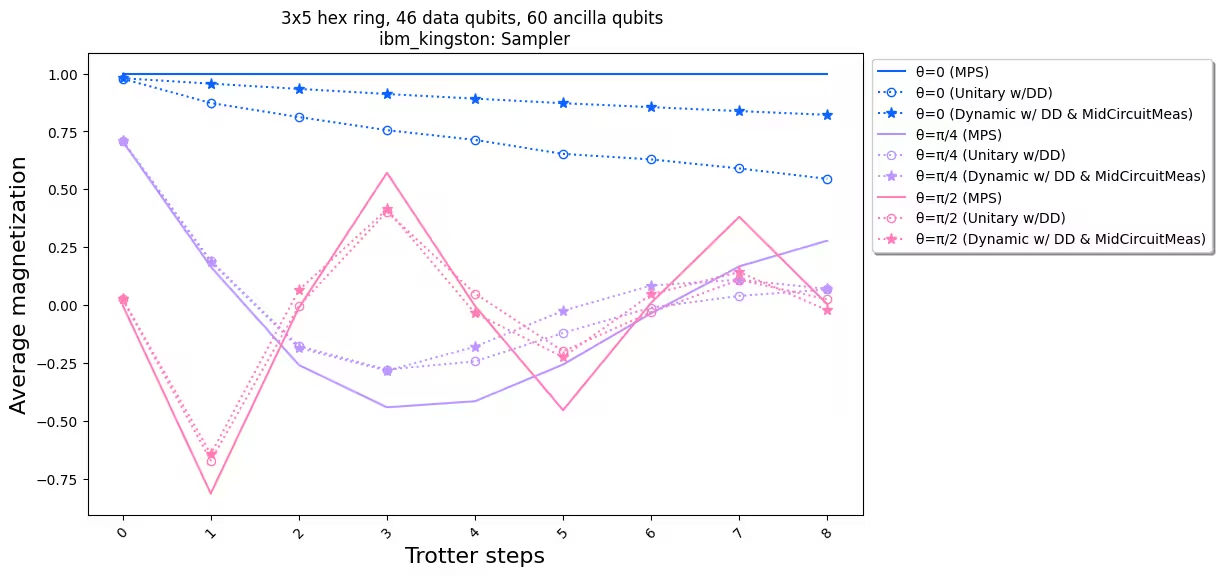
عند مقارنة النتائج التجريبية مع المحاكاة، نلاحظ أن تنفيذ الدائرة الديناميكية (الخط المنقط مع النجوم) يتمتع بأداء أفضل بشكل عام مقارنة بالتنفيذ الوحدوي القياسي (الخط المنقط بعلامات دائرية). باختصار، نقدم الدوائر الديناميكية كحل لمحاكاة نماذج لف آيزنغ على شبكة قرص العسل، وهي طوبولوجيا غير أصلية للعتاد. يسمح حل الدائرة الديناميكية بتفاعلات ZZ بين الكيوبتات غير المتجاورة مباشرة، مع عمق بوابات ثنائية الكيوبت أقصر مقارنة باستخدام بوابات SWAP، على حساب إدخال كيوبتات مساعدة إضافية وعمليات تغذية أمامية كلاسيكية.
المراجع
[1] Quantum computing with Qiskit, by Javadi-Abhari, A., Treinish, M., Krsulich, K., Wood, C.J., Lishman, J., Gacon, J., Martiel, S., Nation, P.D., Bishop, L.S., Cross, A.W. and Johnson, B.R., 2024. arXiv preprint arXiv:2405.08810 (2024)