Iskay Quantum Optimizer - دالة Qiskit من Kipu Quantum
انظر مرجع API
- Qiskit Functions ميزةٌ تجريبية متاحة فقط لمستخدمي خطة IBM Quantum® Premium Plan وFlex Plan وOn-Prem (عبر IBM Quantum Platform API). هي في مرحلة إصدار معاينة وقابلة للتغيير.
نظرة عامة
باستخدام Iskay Quantum Optimizer من Kipu Quantum، يمكنك التعامل مع مسائل التحسين المعقدة على أجهزة IBM® الكمومية. يعتمد هذا المحلّ على خوارزمية bf-DCQO المتطورة التي طوّرتها Kipu، وتستلزم فقط دالة الهدف كمدخل لتوصيل حلول المسألة تلقائياً. تستطيع هذه الخوارزمية التعامل مع مسائل تحسين تصل إلى 156 qubit، مما يتيح استخدام جميع qubits في أجهزة IBM الكمومية. يعتمد المحلّ تعييناً واحداً لواحد بين المتغيرات الكلاسيكية والـ qubits، مما يتيح لك التعامل مع مسائل تحسين تصل إلى 156 متغيراً ثنائياً.
يُتيح هذا المحلّ حلّ مسائل التحسين الثنائي غير المقيّد. إلى جانب صيغة QUBO (التحسين الثنائي التربيعي غير المقيّد) الشائعة الاستخدام، يدعم أيضاً مسائل التحسين ذات الرتب الأعلى (HUBO). يستخدم المحلّ خوارزمية كمومية غير تباينية، تُنجز غالبية الحسابات على الأجهزة الكمومية.
فيما يلي مزيد من التفاصيل حول الخوارزمية المستخدمة ودليل موجز لكيفية استخدام الدالة، إضافةً إلى نتائج المعايرة على أمثلة مسائل متنوعة بأحجام وتعقيدات مختلفة.
الوصف
المحلّ هو تطبيق جاهز للاستخدام لأحدث خوارزميات التحسين الكمومية. يحلّ مسائل التحسين بتشغيل دوائر كمومية شديدة الضغط على العتاد الكمومي. يتحقق هذا الضغط بإدخال حدود مضادة للديباتية (counterdiabatic) في التطور الزمني الأساسي للنظام الكمومي. تُنفذ الخوارزمية عدة تكرارات من عمليات تشغيل العتاد للحصول على الحلول النهائية، وتجمعها مع معالجة لاحقة. تُدمج هذه الخطوات بسلاسة في سير عمل المحلّ وتُنفَّذ تلقائياً.
كيف يعمل محلّ التحسين الكمومي؟
يستعرض هذا القسم أساسيات خوارزمية bf-DCQO المُطبَّقة. يمكن الاطلاع على مقدمة للخوارزمية أيضاً على قناة Qiskit على يوتيوب.
تستند الخوارزمية إلى التطور الزمني لنظام كمومي يتحوّل مع الزمن، حيث يُرمَّز حل المسألة في الحالة الأساسية للنظام الكمومي في نهاية التطور. وفقاً لـمبرهنة الأديباتية، يجب أن يكون هذا التطور بطيئاً لضمان بقاء النظام في حالته الأساسية. رقمنة هذا التطور هي أساس الحوسبة الكمومية الأديباتية الرقمية (DQA) وخوارزمية QAOA الشهيرة. غير أن التطور البطيء المطلوب غير قابل للتطبيق مع تزايد أحجام المسائل، إذ يُفضي إلى تعمّق متزايد في الدوائر. باستخدام البروتوكولات المضادة للديباتية، يمكن قمع الإثارات غير المرغوب فيها التي تحدث خلال أوقات التطور القصيرة مع البقاء في الحالة الأساسية. هنا، تؤدي رقمنة وقت التطور الأقصر هذا إلى دوائر كمومية بعمق أقل وعدد أبواب تشابك أقل.
تستخدم دوائر خوارزميات bf-DCQO عادةً ما يصل إلى عشرة أضعاف أقل من أبواب التشابك مقارنةً بـ DQA، وثلاثة إلى أربعة أضعاف أقل من تطبيقات QAOA القياسية. بسبب العدد الأقل من البوابات، تقع أخطاء أقل خلال تنفيذ الدوائر على العتاد. ولذا، لا يتطلب المحلّ استخدام تقنيات كقمع الأخطاء أو التخفيف منها. تطبيقها في إصدارات مستقبلية يمكن أن يُحسّن جودة الحلول بشكل أكبر.
على الرغم من أن خوارزمية bf-DCQO تستخدم تكرارات، إلا أنها غير تباينية. بعد كل تكرار للخوارزمية، تُقاس توزيع الحالات. يُستخدم التوزيع المُحصَل لحساب ما يُسمى بـ"حقل التحيّز" (bias-field). يتيح حقل التحيّز بدء التكرار التالي من حالة طاقة قريبة من الحل المُوجَد سابقاً. وبهذه الطريقة، تنتقل الخوارزمية مع كل تكرار إلى حلول ذات طاقة أدنى. عادةً، يكفي ما يقارب عشرة تكرارات للتقارب نحو حل، مما يعني في المجمل عدداً أقل بكثير من التكرارات مقارنةً بالخوارزميات التباينية التي تتطلب ما يقارب 100 تكرار.
يجمع المحلّ خوارزمية bf-DCQO مع معالجة لاحقة كلاسيكية. بعد قياس توزيع الحالات، تُجرى عملية بحث محلي. خلال البحث المحلي، تُقلب بتات الحل المُقاس عشوائياً. بعد القلب، تُقيَّم طاقة السلسلة الثنائية الجديدة. إذا كانت الطاقة أقل، تُحتفظ بالسلسلة الثنائية كحل جديد. يُقيَّس البحث المحلي خطياً فقط مع عدد الـ qubits؛ وبالتالي فهو رخيص حسابياً. بما أن المعالجة اللاحقة تُصحح القلبات الثنائية المحلية، فهي تُعوّض أخطاء قلب البت التي كثيراً ما تكون نتيجة لعدم كمال العتاد وأخطاء القراءة.
سير العمل
يلي ذلك مخطط تفصيلي لسير عمل محلّ التحسين الكمومي.
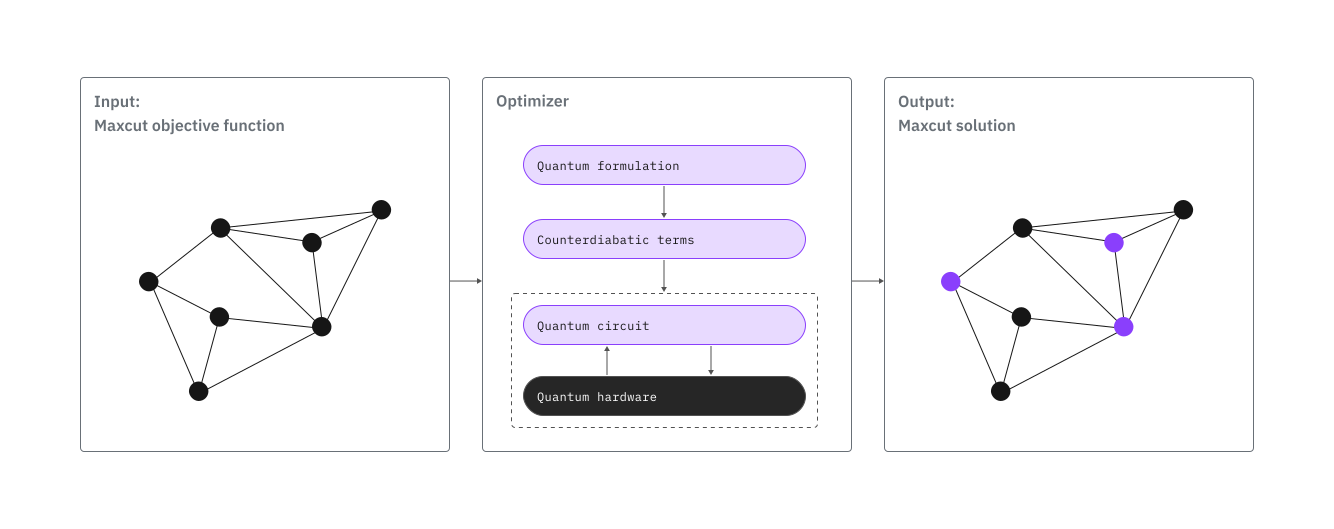
باستخدام محلّ التحسين الكمومي، يمكن اختزال حل مسألة تحسين على عتاد كمومي في:
- صياغة دالة الهدف للمسألة
- الوصول إلى المحلّ عبر Qiskit Functions
- تشغيل المحلّ وجمع النتائج
المعايرة
قد يعتمد الأداء على كل من نموذج المسألة وخطوات المعالجة اللاحقة. في بعض الحالات، قد تحقق العينات الكلاسيكية والعينات المولَّدة كموميًا جودة حل نهائية متشابهة بعد معالجة لاحقة مكافئة. لذلك ينبغي أن يراعي التقييم سير عمل التحسين الكامل.
تُظهر مقاييس المعايرة أدناه أن المحلّ يتعامل بفعالية مع المسائل التي تصل إلى 156 qubit، وتوفر نظرة عامة على دقة المحلّ وقابليته للتوسع عبر أنواع مختلفة من المسائل. لاحظ أن مقاييس الأداء الفعلية قد تتفاوت بحسب خصائص المسألة المحددة، كعدد المتغيرات وكثافة وموضعية الحدود في دالة الهدف والرتبة متعددة الحدود.
يتضمن الجدول التالي نسبة التقريب (AR)، وهي مقياس مُعرَّف كالتالي:
حيث هي دالة الهدف، و، هما قيمتاها الدنيا والقصوى على التوالي، و هي تكلفة أفضل حل تم إيجاده. وبالتالي، AR=100% تعني الحصول على الحالة الأساسية للمسألة.
| المثال | عدد الـ qubits | نسبة التقريب | الوقت الكلي (ث) | استخدام وقت التشغيل (ث) | إجمالي عدد القياسات | عدد التكرارات |
|---|---|---|---|---|---|---|
| MaxCut غير موزون | 28 | 100% | 180 | 30 | 30k | 5 |
| MaxCut غير موزون | 30 | 100% | 180 | 30 | 30k | 5 |
| MaxCut غير موزون | 32 | 100% | 180 | 30 | 30k | 5 |
| MaxCut غير موزون | 80 | 100% | 480 | 60 | 90k | 9 |
| MaxCut غير موزون | 100 | 100% | 330 | 60 | 60k | 6 |
| MaxCut غير موزون | 120 | 100% | 370 | 60 | 60k | 6 |
| HUBO 1 | 156 | 100% | 600 | 70 | 100k | 10 |
| HUBO 2 | 156 | 100% | 600 | 70 | 100k | 10 |
-
تم تشغيل حالات MaxCut ذات 28 و30 و32 qubit على ibm_sherbrooke. أما الحالات ذات 80 و100 و120 qubit فقد شُغّلت على معالج Heron r2.
-
كذلك شُغّلت حالات HUBO على معالج Heron r2.
جميع حالات القياس المعياري متاحة على GitHub (راجع حالات قياس Kipu المعيارية). يمكن العثور على مثال لتشغيل هذه الحالات في المثال 3: حالات القياس المعياري.
البدء
في هذا التوثيق، سنمر بخطوات استخدام Iskay Quantum Optimizer. خلال ذلك، سنُريك بسرعة كيفية تحميل الدالة من الكتالوج وكيفية تحويل مسألتك إلى مدخل صالح، مع إظهار كيف يمكنك التجربة بمعاملات اختيارية مختلفة.
للاطلاع على مثال أكثر تفصيلاً، يُرجى الاطلاع على البرنامج التعليمي حلّ مسألة تقسيم السوق باستخدام Iskay Quantum Optimizer من Kipu Quantum، حيث نمر بالعملية الكاملة لاستخدام محلّ Iskay لمعالجة مسألة تقسيم السوق، التي تمثل تحدي تخصيص موارد من الواقع العملي حيث يجب تقسيم الأسواق إلى مناطق مبيعات متوازنة لتلبية أهداف الطلب الدقيقة.
تحقق من صحة الهوية باستخدام مفتاح API الخاص بك، الموجود على لوحة تحكم IBM Quantum Platform، وحدد دالة Qiskit كالتالي:
# Added by doQumentation — installs the packages this notebook needs if they are missing
import importlib.util

_needed = {"github": "PyGithub", "networkx": "networkx", "qiskit_ibm_catalog": "qiskit-ibm-catalog"}
_missing = [pip for module, pip in _needed.items()
            if importlib.util.find_spec(module) is None]
# One at a time, so a package that fails to install does not block the others
for _pip in _missing:
    %pip install -q {_pip}
if not _missing:
    print("\u2713 All required packages are installed")
# ruff: noqa: F821
يفترض الكود التالي أنك حفظت بيانات اعتمادك. إن لم تفعل، اتبع التعليمات في حفظ حساب IBM Cloud الخاص بك للتحقق من صحة الهوية باستخدام مفتاح API.
from qiskit_ibm_catalog import QiskitFunctionsCatalog

catalog = QiskitFunctionsCatalog(
    channel="ibm_quantum_platform",
    instance="INSTANCE_CRN",
    # For `token`, use the 44-character API_KEY you created
    # and saved from the IBM Quantum Platform Home dashboard
    token="YOUR_API_KEY",
)

# verify that you have access to the function
catalog.list()
[QiskitFunction(qunova/hivqe-chemistry),
 QiskitFunction(global-data-quantum/quantum-portfolio-optimizer),
 QiskitFunction(algorithmiq/tem),
 QiskitFunction(qedma/qesem),
 QiskitFunction(multiverse/singularity),
 QiskitFunction(ibm/circuit-function),
 QiskitFunction(q-ctrl/optimization-solver),
 QiskitFunction(colibritd/quick-pde),
 QiskitFunction(q-ctrl/performance-management),
 QiskitFunction(kipu-quantum/iskay-quantum-optimizer)]
# Access Function
optimizer = catalog.load("kipu-quantum/iskay-quantum-optimizer")
مثال على ضبط مخصص
إليك كيفية ضبط Iskay بإعدادات مختلفة:
custom_options = {
    "shots": 15_000,  # Higher shot count for better statistics
    "num_iterations": 12,  # More iterations for solution refinement
    "preprocessing_level": 1,  # Light preprocessing for problem simplification
    "postprocessing_level": 2,  # Maximum postprocessing for solution quality
    "transpilation_level": 3,  # Use higher transpilation level to optimize circuit
    "seed_transpiler": 42,  # Fixed seed for reproducible results
    "job_tags": ["custom_config"],  # Custom tracking tags
}
تحسين البذرة العشوائية: لاحظ أن seed_transpiler مضبوطة على None بشكل افتراضي. هذا يُتيح لعملية التحسين التلقائية في الـ Transpiler أن تعمل. عند تعيينها None، سيبدأ النظام تجربةً بعدة بذور ويختار التي تُنتج أفضل عمق للدائرة، مستغلاً القوة الكاملة لمعامل max_trials لكل مستوى ترجمة.
أداء مستوى الترجمة: زيادة عدد max_trials بقيم أعلى لـ transpilation_level ستزيد حتماً من وقت الترجمة، لكنها قد لا تغيّر الدائرة النهائية دائماً — يعتمد هذا بشكل كبير على بنية الدائرة وتعقيدها المحدد. ومع ذلك، بالنسبة لبعض الدوائر والمسائل، يمكن أن يكون الفرق بين 10 تجارب (المستوى 1) و50 تجربة (المستوى 5) كبيراً، لذا قد يكون استكشاف هذه المعاملات هو المفتاح للوصول بنجاح إلى حل.
مثال 1: دالة تكلفة بسيطة
لنأخذ دالة التكلفة بصيغة spin التالية:
حيث .
الحل لهذه الدالة البسيطة هو
بالقيمة الدنيا
1. إنشاء دالة الهدف
نبدأ بإنشاء قاموس يحتوي على معاملات دالة الهدف كما يلي:
objective_func = {
    "()": 1,
    "(0,)": 1.5,
    "(1,)": 2,
    "(2,)": 1.3,
    "(0, 3)": 2.5,
    "(1, 4)": 3.5,
    "(0, 1, 2)": 4,
}
2. تشغيل المُحسِّن
نحل المسألة بتشغيل المُحسِّن. بما أن يجب علينا ضبط problem_type=spin.
# Setup options to run the optimizer
options = {"shots": 5000, "num_iterations": 5, "use_session": True}

arguments = {
    "problem": objective_func,
    "problem_type": "spin",
    "backend_name": backend_name,  # such as "ibm_fez"
    "options": options,
}

job = optimizer.run(**arguments)

# Print the ID so you can use it later, if necessary
print(job.job_id)
3. استرجاع النتيجة
يُقدِّم المُحسِّن حل مسألة التحسين مباشرةً.
print(job.result())
سيظهر قاموس على الشكل التالي:
{'solution': {'0': -1, '1': -1, '2': -1, '3': 1, '4': 1},
 'solution_info': {'bitstring': '11100',
  'cost': -13.8,
  'seed_transpiler': 42,
  'mapping': {0: 0, 1: 1, 2: 2, 3: 3, 4: 4}},
 'prob_type': 'spin'}
لاحظ أن القاموس solution يعرض متجه النتيجة .
مثال 2: MaxCut
كثير من مسائل الرسم البياني مثل MaxCut أو Maximum Independent Set هي مسائل NP-hard وتُعدّ مرشحين مثاليين لاختبار الخوارزميات الكمومية والأجهزة. يوضح هذا المثال كيفية حل مسألة MaxCut لرسم بياني ثلاثي المنتظم باستخدام Quantum Optimizer.
لتشغيل هذا المثال يجب تثبيت حزمة networkx إضافةً إلى qiskit-ibm-catalog. لتثبيتها، شغِّل الأمر التالي:
# %pip install networkx numpy
1. إنشاء دالة الهدف
ابدأ بتوليد رسم بياني عشوائي ثلاثي المنتظم، ثم عرِّف دالة الهدف لمسألة MaxCut لهذا الرسم البياني.
import networkx as nx

# Create a random 3-regular graph
G = nx.random_regular_graph(3, 10, seed=42)

# Create the objective function for MaxCut in Ising formulation
def graph_to_ising_maxcut(G):
    """
    Convert a NetworkX graph to an Ising Hamiltonian for the max-cut problem.
    Args:
        G (networkx.Graph): The input graph.
    Returns:
        dict: The objective function of the Ising model
    """
    # Initialize the linear and quadratic coefficients
    objective_func = {}
    # Populate the coefficients
    for i, j in G.edges:
        objective_func[f"({i}, {j})"] = 0.5
    return objective_func

objective_func = graph_to_ising_maxcut(G)
2. تشغيل المُحسِّن
حُلّ المسألة بتشغيل المُحسِّن.
options = {"shots": 5000, "num_iterations": 5, "use_session": True}

arguments = {
    "problem": objective_func,
    "problem_type": "spin",
    "backend_name": backend_name,  # such as "ibm_fez"
    "options": options,
}

job = optimizer.run(**arguments)
3. استرجاع النتيجة
استرجع النتيجة وعيِّن bitstring الحل إلى العقد الأصلية في الرسم البياني.
print(job.result())
يُضمَّن حل مسألة MaxCut مباشرةً في القاموس الفرعي solution من كائن النتيجة
maxcut_solution = job.result()["solution"]
مثال 3: نماذج المعيار
نماذج المعيار متاحة على GitHub: نماذج Kipu المعيارية.
يمكن تحميل النماذج باستخدام مكتبة pygithub. لتثبيتها، شغِّل الأمر التالي:
# %pip install pygithub
مسارات نماذج المعيار هي:
Maxcut:
'maxcut/maxcut_regular_3_100_nodes_weighted.json''maxcut/maxcut_regular_3_140_nodes_weighted.json''maxcut/maxcut_regular_3_150_nodes_weighted.json''maxcut/maxcut_regular_4_130_nodes_weighted.json'
HUBO:
'HUBO/hubo1_marrakesh.json''HUBO/hubo2_marrakesh.json'
لإعادة إنتاج أداء المعيار لنماذج HUBO، اختر الـ backend هو ibm_marrakesh واضبط direct_qubit_mapping على True في القاموس الفرعي options.
المثال التالي يُشغِّل نموذج Maxcut بـ 150 عقدة.
from github import Github
import urllib
import json
import ast

repo = "Kipu-Quantum-GmbH/benchmark-instances"
path = "maxcut/maxcut_regular_3_150_nodes_weighted.json"
gh = Github()
repo = gh.get_repo(repo)
branch = "main"
file = repo.get_contents(urllib.parse.quote(path), ref=branch)

# load json file with benchmark problem
problem_json = json.loads(file.decoded_content)

# convert objective function to compatible format
objective_func = {
    key: ast.literal_eval(value) for key, value in problem_json.items()
}

# Setup configuration to run the optimizer
options = {
    "shots": 5_000,
    "num_iterations": 5,
    "use_session": True,
    "direct_qubit_mapping": False,
}

arguments = {
    "problem": objective_func,
    "problem_type": "spin",
    "backend_name": "<BACKEND-NAME>",
    "options": options,
}

job = optimizer.run(**arguments)

result = job.result()
حالات الاستخدام
تشمل حالات الاستخدام النموذجية لحلّال التحسين مسائل التحسين التوافقي. يمكنك حل مسائل من قطاعات عديدة مثل المال والصيدلة والخدمات اللوجستية. فيما يلي بعض الأمثلة:
- تحسين المحفظة الاستثمارية (QUBO): منشور علمي وورقة بيضاء
- طيّ البروتين (HUBO): منشور علمي
- جدولة الخدمات اللوجستية (QUBO): منشور علمي
- تحسين الشبكات: ندوة عبر الإنترنت
- تقسيم السوق (QUBO): درس تعليمي
إذا كنت مهتماً بمعالجة حالة استخدام محددة وتطوير تعيين مخصص لها، يمكننا مساعدتك. تواصل معنا.
الحصول على الدعم
للحصول على الدعم، تواصل مع support@kipu-quantum.com.
الخطوات التالية
-
تفضّل بزيارة مرجع API لدالة Qiskit هذه.
-
جرِّب درس حل مسألة تقسيم السوق باستخدام Iskay Quantum Optimizer من Kipu Quantum.
معلومات إضافية
كلمة Iskay، مثل اسم شركتنا Kipu Quantum، هي كلمة بيروفية. وعلى الرغم من أننا شركة ناشئة من ألمانيا، إلا أن هذه الكلمات تعود إلى البلد الأصلي لأحد مؤسسينا المشاركين، حيث كانت Quipu واحدة من أولى آلات الحساب التي طوّرتها البشرية قبل 2000 عام قبل الميلاد.